AI Memory Manager
A list of things the assistant remembers about someone, with edit and delete for each item, a way to add one, and a switch to turn memory off.
One HTML file with the CSS and JavaScript inside. No library needed. MIT license.
How to use it
- Click Copy the code, or download the file.
- Paste the CSS into your stylesheet, the HTML where you want the component, and the script before the closing body tag.
- Change
--accentat the top of the CSS to your brand color, then connect the events to your AI service.
What you get
- Works in light and dark mode automatically
- Keyboard friendly, with labels for screen readers
- Fits phones, tablets and desktops
- Respects the reduced motion setting
- No framework, so it works with any stack
The code
<!DOCTYPE html>
<!--
  AI Memory Manager: a free AI UI component
  From 100 Free AI UI Components by MM Rahman Bappi, MIT license
  https://mmrahmanbappi.github.io/100-free-ai-ui-components/

  How to use: copy the CSS, HTML and JavaScript below into your page.
  Colors are CSS variables at the top. Change --accent to match your brand.
  Light and dark themes follow the visitor's system setting, or set
  data-theme="dark" or data-theme="light" on the html element.
-->
<html lang="en">
<head>
<meta charset="UTF-8">
<meta name="viewport" content="width=device-width, initial-scale=1">
<title>AI Memory Manager | Free AI UI Component</title>
<meta name="description" content="A list of things the assistant remembers about someone, with edit and delete for each item, a way to add one, and a switch to turn memory off.">
<meta name="robots" content="noindex, follow">
<style>
:root{
  --accent:#5b5bd6; --accent-ink:#fff; --accent-soft:#ececfc;
  --bg:#f7f7f8; --surface:#fff; --surface-2:#f1f1f4; --ink:#17171c; --text:#3a3a44; --muted:#6c6c78;
  --line:#e3e3e8; --good:#15803d; --warn:#b45309; --bad:#c62828;
  --radius:14px; --shadow:0 1px 2px rgba(20,20,30,.06),0 8px 24px -12px rgba(20,20,30,.18);
  --font:system-ui,-apple-system,"Segoe UI",Roboto,Ubuntu,sans-serif; --mono:ui-monospace,"Cascadia Code",Menlo,Consolas,monospace;
}
@media (prefers-color-scheme:dark){:root:not([data-theme=light]){
  --accent:#8b8bff; --accent-ink:#0f0f16; --accent-soft:#25254a;
  --bg:#0f0f13; --surface:#18181f; --surface-2:#212129; --ink:#f3f3f6; --text:#d4d4dc; --muted:#9a9aa8;
  --line:#2c2c36; --good:#4ade80; --warn:#fbbf24; --bad:#f87171; --shadow:0 1px 2px rgba(0,0,0,.4),0 10px 30px -12px rgba(0,0,0,.6);
}}
:root[data-theme=dark]{
  --accent:#8b8bff; --accent-ink:#0f0f16; --accent-soft:#25254a;
  --bg:#0f0f13; --surface:#18181f; --surface-2:#212129; --ink:#f3f3f6; --text:#d4d4dc; --muted:#9a9aa8;
  --line:#2c2c36; --good:#4ade80; --warn:#fbbf24; --bad:#f87171; --shadow:0 1px 2px rgba(0,0,0,.4),0 10px 30px -12px rgba(0,0,0,.6);
}
*{box-sizing:border-box}
html,body{margin:0}
body{min-height:100vh;display:grid;grid-template-columns:minmax(0,1fr);place-items:center;padding:24px;background:var(--bg);color:var(--text);font:15px/1.5 var(--font);-webkit-font-smoothing:antialiased}
button,input,textarea,select{font:inherit;color:inherit}
:focus-visible{outline:2px solid var(--accent);outline-offset:2px}
[hidden]{display:none!important}
.sr{position:absolute;width:1px;height:1px;overflow:hidden;clip:rect(0 0 0 0);white-space:nowrap}
@media (prefers-reduced-motion:reduce){*,*::before,*::after{animation-duration:.01ms!important;animation-iteration-count:1!important;transition:none!important}}
/* ---- component ---- */
.wrap{width:min(100%,620px);display:flex;flex-direction:column;gap:14px}
.card{background:var(--surface);border:1px solid var(--line);border-radius:var(--radius);box-shadow:var(--shadow);padding:16px 18px}
.card h2{font-size:15px;margin:0 0 4px;color:var(--ink)}
.muted{color:var(--muted);font-size:13px}
.num{font-variant-numeric:tabular-nums}
.btn{display:inline-flex;align-items:center;justify-content:center;gap:6px;border:1px solid var(--line);background:var(--surface);color:var(--ink);border-radius:10px;padding:8px 14px;font-size:14px;font-weight:600;cursor:pointer}
.btn:hover{border-color:var(--accent)}.btn.pri{background:var(--accent);border-color:var(--accent);color:var(--accent-ink)}.btn:disabled{opacity:.45;cursor:not-allowed}
.btn.sm{padding:5px 10px;font-size:13px;border-radius:8px}
.ib{width:28px;height:28px;display:grid;place-items:center;border:0;background:none;color:var(--muted);border-radius:7px;cursor:pointer;flex:none}
.ib:hover{background:var(--surface-2);color:var(--ink)}.ib:disabled{opacity:.3;cursor:not-allowed}
.pill{display:inline-flex;align-items:center;gap:5px;font-size:12px;font-weight:600;border-radius:99px;padding:2px 9px;border:1px solid}
.pill.run{color:var(--accent);border-color:color-mix(in srgb,var(--accent) 40%,var(--line))}
.pill.ok{color:var(--good);border-color:color-mix(in srgb,var(--good) 40%,var(--line))}
.pill.bad{color:var(--bad);border-color:color-mix(in srgb,var(--bad) 40%,var(--line))}
.pill.wait{color:var(--muted);border-color:var(--line)}
pre{margin:0;font:12.5px/1.55 var(--mono);background:var(--surface-2);border:1px solid var(--line);border-radius:10px;padding:10px 12px;overflow-x:auto;color:var(--ink)}
.tg{width:40px;height:23px;border-radius:99px;background:var(--line);position:relative;flex:none;border:0;cursor:pointer;padding:0}
.tg::after{content:"";position:absolute;top:3px;left:3px;width:17px;height:17px;border-radius:50%;background:#fff;transition:left .15s}
.tg[aria-checked=true]{background:var(--accent)}.tg[aria-checked=true]::after{left:20px}
.hd{display:flex;justify-content:space-between;align-items:center;gap:12px}
ul.mem{list-style:none;margin:14px 0 10px;padding:0;display:flex;flex-direction:column;gap:6px}
ul.mem li{display:flex;align-items:center;gap:6px;border:1px solid var(--line);border-radius:10px;padding:6px 6px 6px 12px;background:var(--surface)}
ul.mem li span{flex:1;font-size:14px;color:var(--ink);min-width:0;overflow-wrap:anywhere}
ul.mem li input{flex:1;border:1px solid var(--accent);border-radius:7px;padding:5px 8px;background:var(--surface);color:var(--ink);font-size:14px;min-width:0}
.off ul.mem{opacity:.45;pointer-events:none}
.add{display:flex;gap:8px}.add input{flex:1;border:1px solid var(--line);border-radius:10px;padding:8px 10px;background:var(--surface);color:var(--ink);min-width:0}
.add input:focus{outline:0;border-color:var(--accent)}
.empty{font-size:14px;color:var(--muted);text-align:center;padding:12px;border:1px dashed var(--line);border-radius:10px}
</style>
</head>
<body>
<div class="wrap"><div class="card" id="card">
  <div class="hd"><div><h2 id="mh">Memory</h2><p class="muted" style="margin:0">Things the assistant remembers to help you better.</p></div><button class="tg" type="button" role="switch" aria-checked="true" aria-labelledby="mh" id="on"></button></div>
  <ul class="mem" id="mem"></ul>
  <form class="add" id="add"><label class="sr" for="ni">Add something to remember</label><input id="ni" placeholder="Add something to remember"><button class="btn sm" type="submit">Add</button></form>
  <p class="muted" id="st" role="status" aria-live="polite" style="margin:10px 0 0"></p>
</div></div>
<script>
// Demo helper: add ?theme=dark or ?theme=light to the address to preview a theme.
(function(){var t=new URLSearchParams(location.search).get('theme');if(t)document.documentElement.dataset.theme=t;})();
var M=['Prefers short answers with bullet points','Is learning Spanish, at a beginner level','Works as a product designer','Is vegetarian'];
var mem=document.getElementById('mem'),st=document.getElementById('st'),card=document.getElementById('card'),on=document.getElementById('on');
var PEN='<svg viewBox=\"0 0 24 24\" width=\"14\" height=\"14\" fill=\"none\" stroke=\"currentColor\" stroke-width=\"2\" stroke-linecap=\"round\" stroke-linejoin=\"round\" aria-hidden=\"true\"><path d=\"M12 20h9\"/><path d=\"M16.5 3.5a2.1 2.1 0 013 3L7 19l-4 1 1-4z\"/></svg>',DEL='<svg viewBox=\"0 0 24 24\" width=\"14\" height=\"14\" fill=\"none\" stroke=\"currentColor\" stroke-width=\"2\" stroke-linecap=\"round\" stroke-linejoin=\"round\" aria-hidden=\"true\"><path d=\"M4 7h16M10 11v6M14 11v6M6 7l1 13h10l1-13M9 7V4h6v3\"/></svg>';
function render(){mem.innerHTML=M.length?'':'<li class="empty" style="justify-content:center;border-style:dashed">Nothing saved yet.</li>';
  M.forEach(function(m,i){var li=document.createElement('li');li.innerHTML='<span></span><button class="ib" type="button">'+PEN+'</button><button class="ib" type="button">'+DEL+'</button>';li.querySelector('span').textContent=m;
    var b=li.querySelectorAll('.ib');b[0].setAttribute('aria-label','Edit: '+m);b[1].setAttribute('aria-label','Forget: '+m);
    b[1].onclick=function(){M.splice(i,1);render();st.textContent='Forgotten: '+m;};
    b[0].onclick=function(){var inp=document.createElement('input');inp.value=m;inp.setAttribute('aria-label','Edit memory');li.replaceChild(inp,li.querySelector('span'));inp.focus();
      function done(k){if(k&&inp.value.trim()){M[i]=inp.value.trim();st.textContent='Memory updated';}render();}inp.onkeydown=function(e){if(e.key==='Enter'){e.preventDefault();done(true);}if(e.key==='Escape')done(false);};inp.onblur=function(){done(true);};};
    mem.appendChild(li);});}
document.getElementById('add').addEventListener('submit',function(e){e.preventDefault();var ni=document.getElementById('ni'),v=ni.value.trim();if(!v)return;M.push(v);ni.value='';render();st.textContent='Saved: '+v;});
on.addEventListener('click',function(){var v=on.getAttribute('aria-checked')!=='true';on.setAttribute('aria-checked',v);card.classList.toggle('off',!v);
  document.getElementById('ni').disabled=!v;st.textContent=v?'Memory is on.':'Memory is off. Nothing new will be saved, and saved items are not used.';});
render();
</script>
</body>
</html>
More agents and tools components
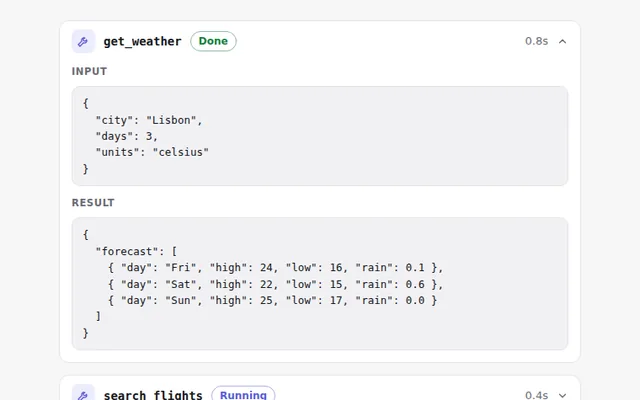
Tool Call Card
Shows that the AI used a tool, with its name, status and time. Open it to see the exact input and the result it got back.
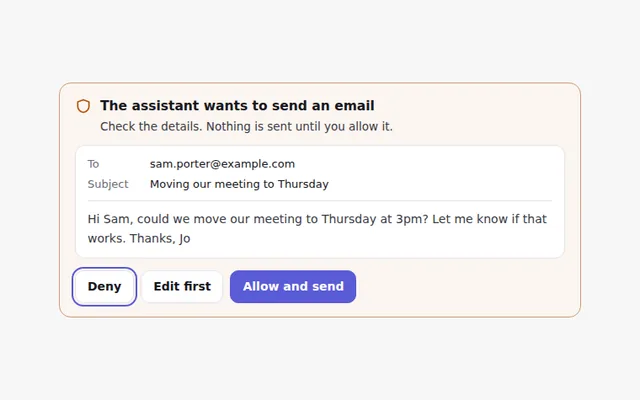
Action Approval Request
Before an agent does something important, like sending an email, it shows exactly what it will do and waits for Allow or Deny.
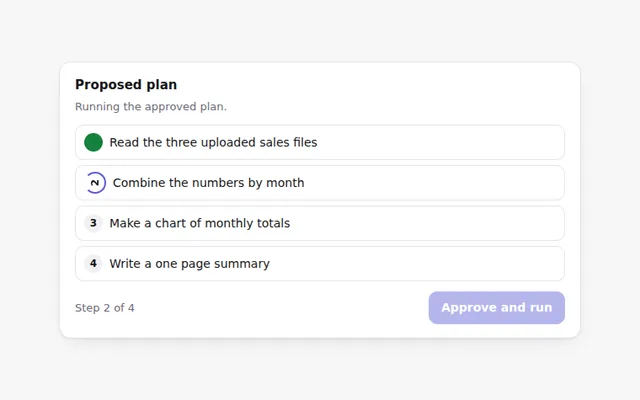
Editable Task Plan
The agent proposes a step by step plan before it starts. People can reorder, edit or remove steps, then approve the plan to run it.
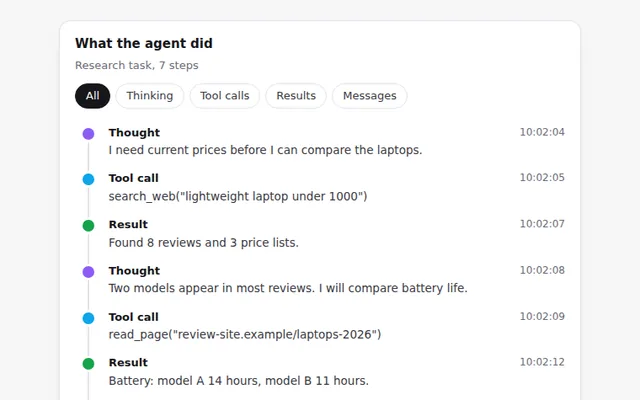
Agent Activity Timeline
A timeline of everything an agent did: its thinking, tool calls, results and messages, with times and a filter by type.
File Change Preview
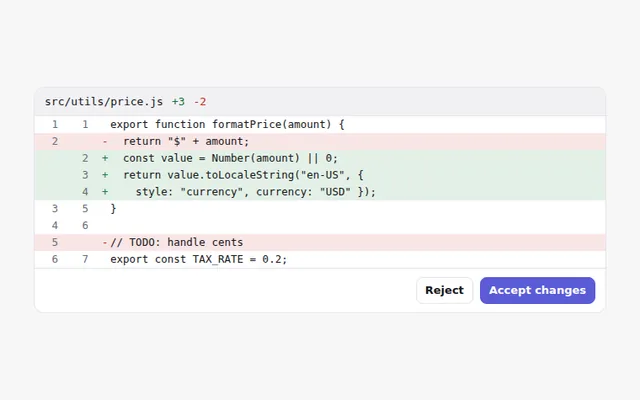
Shows the changes an AI wants to make to a file, with removed lines in red and added lines in green, and buttons to accept or reject.
Web Results Card
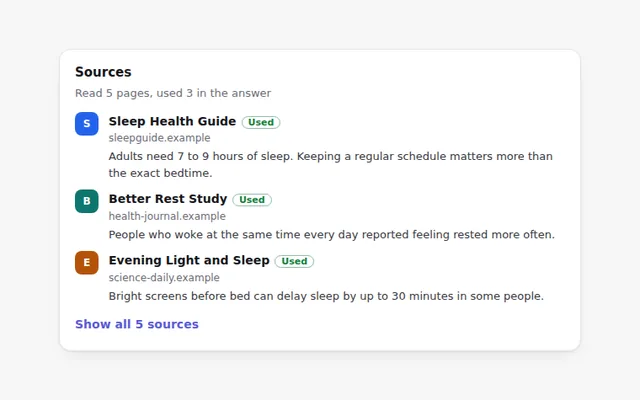
A card listing the web pages an AI read, with title, site and a short excerpt. Pages it used in the answer are marked.