Home / AI in the Browser / QR and Barcode Scanner
QR and Barcode Scanner in JavaScript, Free with Live Demo
Free QR code and barcode scanner in plain JavaScript. Scan with your camera or a photo, read QR, EAN, UPC and more, and make your own QR codes. Works on phones.
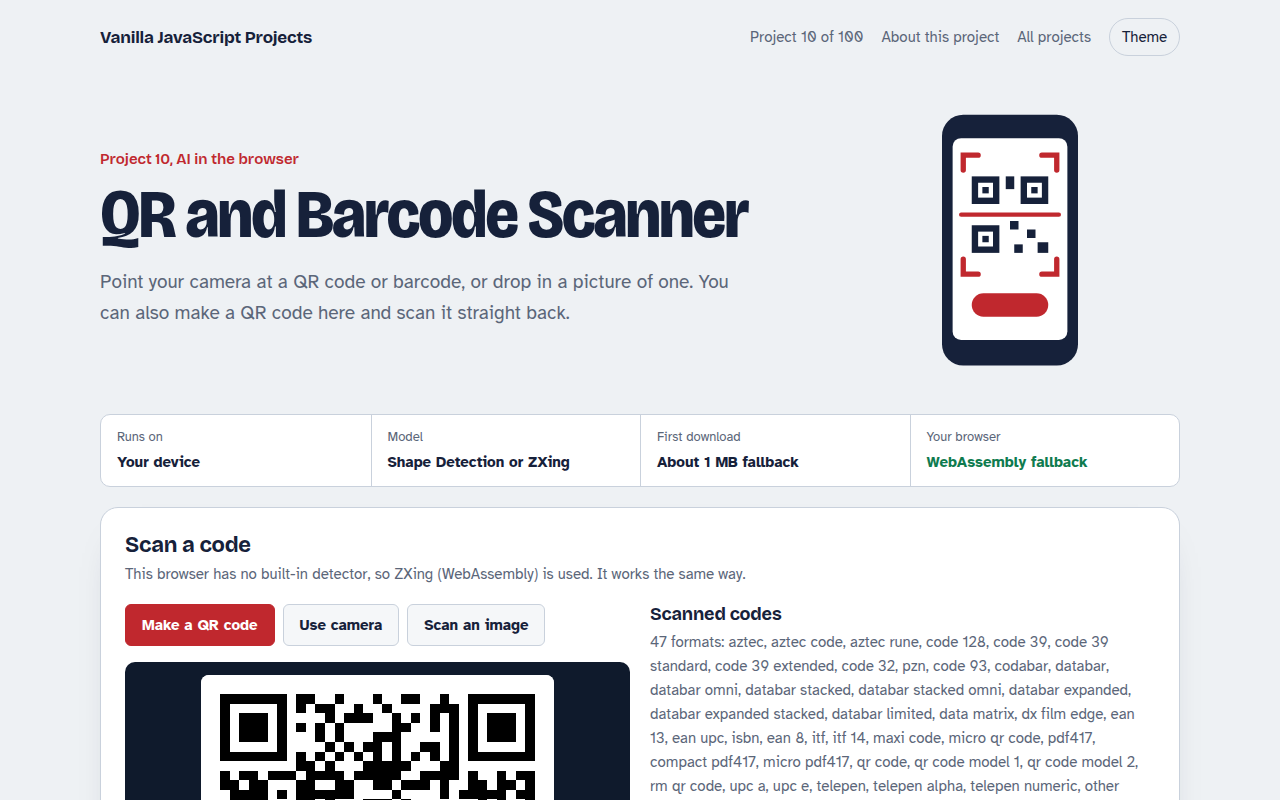
Runs on: Your device. Native: Chrome and Edge on Android and macOS, Samsung Internet. Fallback: every modern browser. Camera needs HTTPS or localhost.
What is the QR and Barcode Scanner?
Point your phone or laptop camera at a QR code or a product barcode and this page reads it instantly, drawing a box around the code it found. You can also upload a screenshot or photo, and there is a small QR maker so you can test it.
It uses the BarcodeDetector API, which is built into Chrome on Android and some other browsers. Where it is missing, the page loads a small WebAssembly version of the ZXing scanner that works the same way.
Good for
- Event check in and ticket scanning
- Stock and inventory apps
- Menu, payment and link QR codes
- Learning camera access in JavaScript
What this project does
- Live camera scanning with a box drawn around each code
- Scan from an uploaded photo or screenshot
- QR, EAN, UPC, Code 128, Data Matrix, PDF417 and more
- Built-in QR code maker to test with
- Face detection when the browser supports it
- Scan history with copy and safe link opening
How it works
- Pick a detectorThe page uses the browser's own BarcodeDetector when it exists, otherwise it loads the same API backed by ZXing WebAssembly.
- Scan framesAbout five times a second, the current camera frame is passed to detect(), which returns each code with its corner points.
- Show resultsCorners are drawn on a canvas over the video, and new codes are added to the history with a short beep.
The key JavaScript
This is the heart of the project. The full file has the rest, including the screen layout and error handling.
// Native API, or the same API backed by ZXing WebAssembly
const Detector = "BarcodeDetector" in window
  ? window.BarcodeDetector
  : (await import("https://cdn.jsdelivr.net/npm/barcode-detector@3.2.2/dist/es/ponyfill.js")).BarcodeDetector;

const detector = new Detector({ formats: ["qr_code", "ean_13", "code_128"] });

// Works with <video>, <img>, <canvas>, ImageBitmap or a Blob
const codes = await detector.detect(videoElement);
for (const c of codes) console.log(c.format, c.rawValue, c.cornerPoints);
How to use it
- Click Download HTML file above.
- Open the file in a code editor, like VS Code.
- Run it from a local server with
npx serve .so the camera, microphone and AI features are allowed. - Change the text and colors, then upload it to GitHub Pages, Netlify or your own site. It is one file with no build step.
Questions people ask
How do I scan a QR code with JavaScript?
Get the camera with getUserMedia, show it in a video element, and pass frames to BarcodeDetector.detect(). This project shows the full loop with a fallback for browsers that lack the API.
Which barcode types can it read?
QR, EAN 13, EAN 8, UPC A, UPC E, Code 128, Code 39, Data Matrix, PDF417, Aztec and more, depending on the browser.
Why does the camera not start?
Browsers only allow the camera on HTTPS or localhost. On GitHub Pages it works, but opening the file straight from your disk will block it.
More AI in the Browser projects
001. Local AI Chatbot
A private chat assistant that runs on your graphics card
002. Image Classifier
Drop a photo and see what the AI thinks it is
003. Speech to Text Notes
A voice notes app that writes down what you say
004. AI Text Summarizer
Paste a long article and get the key points
005. Smart Writing Assistant
A writing helper that drafts, rewrites and checks your text